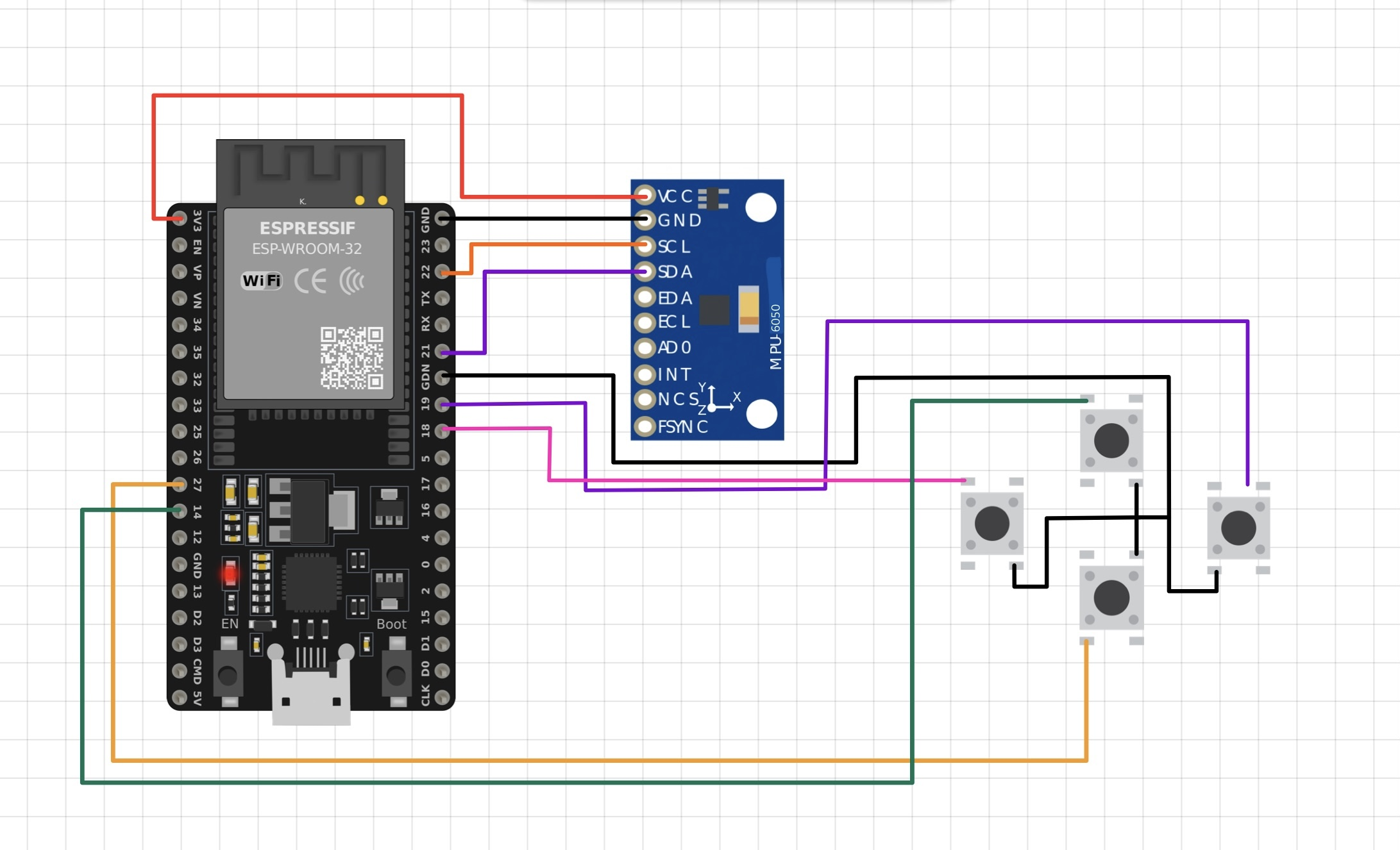
Description:
This project is a Wireless Air Mouse built using an ESP32 and MPU6050 (gyroscope + accelerometer) for an IEEE hackathon. The device uses Bluetooth Low Energy (BLE) to control the mouse cursor through hand movements, along with physical buttons for left click, right click, and scrolling.
Although the project did not win the hackathon, it was a valuable hands-on learning experience in embedded systems, sensor data processing, and BLE communication. The implementation includes gyro calibration, deadzone handling, dynamic sensitivity scaling, and button-based mouse actions for smoother and more stable control.
The project was inspired by Circuit Forge’s Air Mouse implementation, which helped guide the overall approach while allowing room for experimentation and improvements.
Inspiration & Reference:
Circuit Forge – Air Mouse
Sample Code (ESP32 + MPU6050 BLE Mouse)
#include <BleMouse.h>
#include <Adafruit_MPU6050.h>
#include <Adafruit_Sensor.h>
#include <Wire.h>

BleMouse bleMouse("ESP32 BLE Mouse");
Adafruit_MPU6050 mpu;

// Button pins
#define LEFT_CLICK_PIN  18
#define RIGHT_CLICK_PIN 19
#define SCROLL_UP_PIN   14
#define SCROLL_DOWN_PIN 27

// Base sensitivity and threshold
float baseSensitivity = 10.0;
float threshold       = 0.01;

void setup() {
  Serial.begin(115200);
  bleMouse.begin();

  if (!mpu.begin()) {
    while (1);
  }

  mpu.setAccelerometerRange(MPU6050_RANGE_4_G);
  mpu.setGyroRange(MPU6050_RANGE_500_DEG);
  mpu.setFilterBandwidth(MPU6050_BAND_21_HZ);

  pinMode(LEFT_CLICK_PIN, INPUT_PULLUP);
  pinMode(RIGHT_CLICK_PIN, INPUT_PULLUP);
  pinMode(SCROLL_UP_PIN, INPUT_PULLUP);
  pinMode(SCROLL_DOWN_PIN, INPUT_PULLUP);
}

void loop() {
  if (bleMouse.isConnected()) {
    sensors_event_t a, g, temp;
    mpu.getEvent(&a, &g, &temp);

    float moveX = g.gyro.z;
    float moveY = g.gyro.y;

    if (fabs(moveX) < threshold) moveX = 0;
    if (fabs(moveY) < threshold) moveY = 0;

    float speed = sqrt(moveX * moveX + moveY * moveY);
    float sensitivity = baseSensitivity * (1 + speed * 0.2);

    bleMouse.move((int)-moveX * sensitivity, (int)moveY * (sensitivity + 2));

    if (digitalRead(LEFT_CLICK_PIN) == LOW) bleMouse.press(MOUSE_LEFT);
    else bleMouse.release(MOUSE_LEFT);

    if (digitalRead(RIGHT_CLICK_PIN) == LOW) bleMouse.press(MOUSE_RIGHT);
    else bleMouse.release(MOUSE_RIGHT);

    if (digitalRead(SCROLL_UP_PIN) == LOW) bleMouse.move(0, 0, 1);
    if (digitalRead(SCROLL_DOWN_PIN) == LOW) bleMouse.move(0, 0, -1);
  }

  delay(5);
}
Event & Build Story (IEEE Hackathon):
This project was built for an IEEE hackathon, and the timing made it especially challenging. The hackathon coincided with our college exam period, which meant very limited preparation time.
We ended up building the working prototype just one day before the event. The night before the hackathon was hectic and exhausting — most of the time went into wiring, soldering, and last-minute testing. Unfortunately, during soldering, the MPU6050 got short-circuited, which affected sensor readings and stability. As a result, we couldn’t demonstrate the project smoothly during the presentation.
After the event, we revisited the idea, replaced the damaged MPU6050, and rebuilt the circuit properly. With a fresh sensor and cleaner wiring, the Air Mouse worked as intended, allowing us to fully implement motion control, clicks, and scrolling.
Although we didn’t win the hackathon, the experience taught us valuable lessons about:
- Time management during exams + hackathons
- Hardware reliability and careful soldering
- Debugging under pressure
- Iterating and improving a project even after failure
This post-event rebuild helped turn a rushed prototype into a functional and polished version of the project.